The Hardware Override
On top of the device control logic (which is what apis like the KM API use to control the mouse), there is a hardware override layer, which is designed to allow the user to take control of their mouse in the event that their software provider incorrectly uses the API.
For example, if the software provider sends km.left(1), and mistakenly never sends km.left(0), the user likely
wouldn’t want their mouse to be stuck down forever. This is where the Hardware Override steps in.
The Hardware Override is a simple state machine, defining when the software input is to be ignored in favor of the hardware input. How it behaves can be seen in the image below.
TODO: Update image to match behavior with timed forced releases.
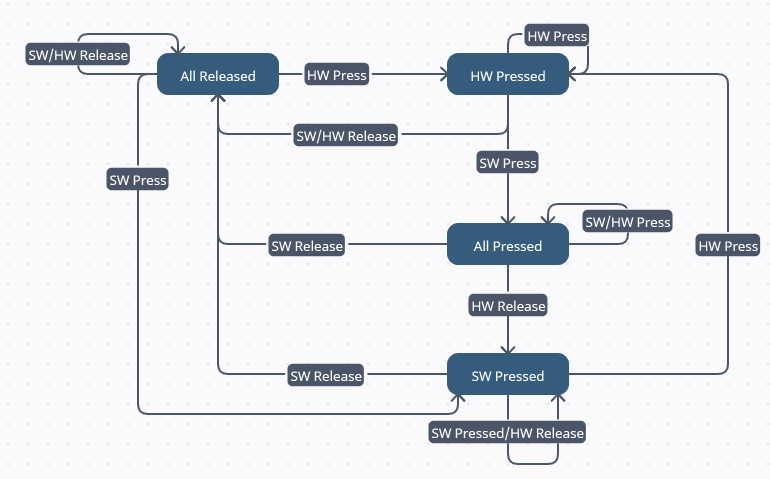
In this image, HW Press/Release means the physical button on the mouse was pressed/released, and SW Press/Release means
the software sent a down/up request (ex: km.left(0) or km.left(1)).
This image may seem daunting at first, but it can make sense by breaking it down into small steps. Such as by starting
at All Released, and seeing where it goes when you press a button, or send a command. It should hopefully quickly
make sense how the override works, and how a user can press or release a button to override a software input.